tiny-metamcp
A self-hosted MCP aggregator giving AI assistants one signed-in endpoint to my own tools, with OAuth 2.1/PKCE and per-user access control. Plus reusable MCP servers.
- Context
- Personal
- Period
- May 2026 – ongoing
Background
MCP (Model Context Protocol) is an open standard for giving an AI assistant such as Claude access to outside tools and data, for example a lookup against an API or a web page. Each tool is a small “MCP server” the assistant can call.
I wanted the assistant to be able to use my own tools. Connecting every server to every client separately gets messy fast, and an open endpoint that lets an AI reach things is not something I want to leave running without proper sign-in. The answer was a small aggregator I can operate myself: tiny-metamcp. It is inspired by MetaMCP, but lighter and made for Coolify. Alongside it I keep mcp-tools, a separate repo with the tools themselves. It runs on my own server and is in daily use as the connector for my AI assistant.
What I built
tiny-metamcp gathers several MCP servers behind one endpoint.
- One entry point, many servers. The aggregator starts and supervises child servers installed from PyPI (
uvx), npm (npx) or a git repo, and can also connect to remote servers over HTTP. Tools are exposed with the server name as a prefix (server__tool), so names never collide. - Standards-based sign-in. Claude connects with OAuth 2.1: discovery through
.well-known, dynamic client registration, PKCE (S256 only) and token exchange, with no key to paste. Clients without OAuth, such as Claude Desktop, use a personal token I generate in the admin panel. The token is stored only as a hash. - Login with GitHub or Steam. Both sit behind a shared
IdentityProviderabstraction. The identities stay separate until the user links them from the account page. - Per-user access control. There is an admin role, and each server is either visible to everyone or private to its owner. This is enforced in the tool list, on calls and in the admin API.
- Admin panel. Add, edit, enable, disable and restart servers, watch logs live, try tools directly and manage users. Server management is also available as MCP tools, so I can run the aggregator from the conversation itself.
mcp-tools is a uv monorepo of small MCP servers that run directly with uvx --from git+…: fetching elements from a
web page with a CSS selector, recipe extraction, Open Library, the Steam Web API and Backblaze B2.
Architecture
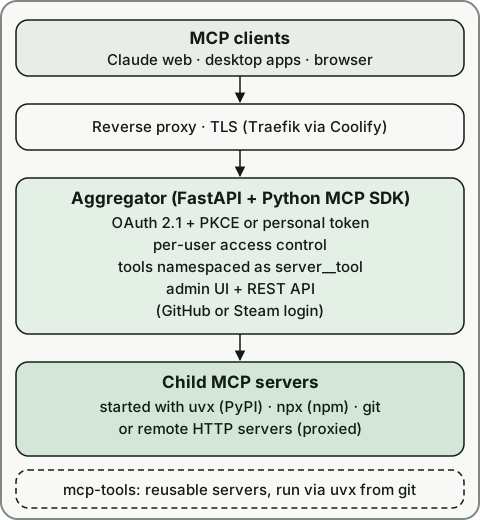
Each child server runs as its own process, and the aggregator holds an MCP client session to it. Each has a lifecycle of start, stop and restart, and stderr goes to a log file per server. Towards clients the aggregator offers both SSE and Streamable HTTP. State (servers, users, tokens) lives in SQLite. The whole service is packaged as a Docker Compose file and deployed through Coolify.
Tech
Python (FastAPI, MCP SDK, SQLModel, aiosqlite) on the backend, a React 19 interface with TypeScript, Vite, Tailwind and
TanStack Router/Query, and uv for packaging. More than 190 test functions in pytest cover the OAuth flow, access
control and child-process handling, among other things. ruff and pre-commit handle quality checks. The repo contains
Claude Code configuration plus specs and plans for each feature, so it was developed with AI as a tool.
What I learned
- Authentication is following a specification. Implementing an OAuth server myself taught me what PKCE actually protects against, why codes and sessions get short lifetimes, and why I accept only the strongest method instead of supporting everything.
- Access has to be enforced on every surface. When I introduced users and private servers, the rules had to hold in the REST API, in the tool list and in the MCP management tools. One forgotten path would have leaked.
- Child-process lifecycles are hard. I test against a real local MCP server rather than a mock, because the bugs tend to sit in how async tasks interact with cancellation.
- Operations are part of the job. Upgrading meant migrating existing data automatically so nobody has to do it by hand, and the README spells out what remains manual.
- Reuse pays off. Splitting the tools out into mcp-tools means any MCP client or aggregator can run them, not only mine.