Browser extension for the case management system
A Chrome extension that fills gaps in the system we use to follow up participants – documents that look right on paper, tasks that don't slip, and results reports we can check.
- Context
- Work
- Period
- May 2025 – ongoing
- Users
- ~40, of them ~14 daily
- Code
- Code in a private repository
Part 1 · For the service
The gaps in everyday work
The system we use to follow up participants has a document editor in the browser, but no preview – just a button that exports to PDF. The template we got had the elements we asked for, but the result looked like a printout of a web page, with automatic metadata we did not want. Getting a document to look decent took round after round of export, adjust and export again.
The AFT results reporting was another gap: the built-in report could not be checked or adjusted, and the numbers never quite added up. It was not good enough for us to use. On top of that, the same information is registered both with NAV (the Norwegian labour and welfare administration) and in the system, and tasks close to their deadline are easy to miss.
The extension is not made together with the vendor. It sits next to the system and fills the gaps, so colleagues can keep working where they already are. It started in spring 2025 as a small side panel, and the first version took about a month alongside my job as a job consultant. In spring 2026 I rebuilt it from scratch as version 2.0.
Who uses what
| Feature | Who | What it gives |
|---|---|---|
| Print view | Everyone, around 40 | Documents that look like well-made physical documents, adjusted before export |
| Highlighted task list | Everyone | Tasks close to their deadline are filtered out and made visible |
| Daily work in the side panel | The AFT team (11) and 2 more | Less time and frustration in document work |
| AFT results reports | Me and 1–2 more | Reporting is possible, with numbers that can be traced and adjusted |
More in the side panel
- NAV reconciliation: fetches participant lists from NAV, compares them with the records in the system and shows differences field by field. From there, participants can be created or updated. Differences are sorted by importance and can be ignored – they reappear if something changes.
- Reports: the AFT results report, with a manual review layer for what takes professional judgement (such as end reasons), and the attachment for reimbursement claims, where person-months are calculated by NAV’s rules. Lists and reports can be exported to Excel.
- Statistics over time: a local, anonymised store covering periods further back than the system itself keeps data.
- Overview and contacts: a filterable participant overview, and external contacts with business-register lookup.
Part 2 · Under the hood
Real-time pagination
The core of the print view is pagination in HTML. It splits the content from the editor into pages as you type, with the right page layout and editable headers and footers. It was harder to get right than I expected:
- No lone words or lines at the top of a new page.
- Tables that look as tidy on paper as they do in the editor.
- The pages are recalculated in real time, so spacing and adjustments can be made before export.
The first version was entirely home-made, and was in daily use for about a year. When I revised it, I moved to Paged.js. Having worked through the problem myself, I knew what the library had to solve, and what still had to be adapted to our documents.
Architecture and releases
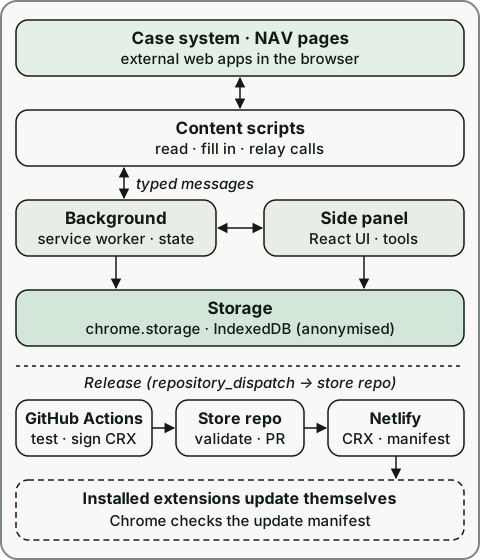
The extension is built with WXT and consists of isolated parts that talk through typed messages: a React side panel, a background service worker that holds state and orchestrates fetching, content scripts that read and fill in the pages of the system, and a small script on the NAV site.
The release pipeline is automated. GitHub Actions type-checks, tests and builds every push and pull request to the
main branch. A commit marked as a release also signs the extension as a CRX package, creates a GitHub Release with a
changelog and sends a repository_dispatch event to a separate store repository. There, a workflow fetches the package,
checks its signing key and extension ID, and opens a pull request with the new package and update manifest. Over 50
versions have been published that way.
Distribution is something I set up as well: an extension store of our own on a static web server (Netlify), and an Intune policy that rolls the extension out to every PC in the company. Nobody has to install anything.
The calculation behind the results report first existed as a separate Python tool. It has been ported to TypeScript and moved into the extension, with a manual review layer for what takes professional judgement.
What I learned
- Build it yourself, and know when to switch. Writing my own pagination taught me the problem. That made choosing a library later easy.
- Small gaps, big effect. The most used feature solves an annoyance everyone had got used to.
- Building on a system you don’t own. The system can change at any time, so scraping its pages is a fragile contract. I learned to pin it down with tests against real HTML excerpts.
- Writing to another system calls for humility. An earlier version re-sent the whole form on update, changing fields nobody had touched. Now only changed fields are written, tested against real save requests.
- Releases should be boring. When colleagues depend on the tool, updates have to just happen. Version 2.0 was followed by a thorough architecture and code review, stronger CI and more than 900 automated tests.